State-of-the-Art
Home Cinema Video Processing
Uncompromised picture quality on every display. Tone mapping, geometry correction, and aspect ratio control for projectors and flat panels.
Every pixel, perfected
HDR Tone Mapping
Scene-adaptive tone curves bring HDR into your display’s brightness range, with controls to balance highlight detail, shadow visibility, and color.
Geometric Correction
Align the projected image with your screen. Correct barrel or pincushion distortion and adjust the frame against an on-screen grid.
Tune lens distortion and frame alignment independently. Preview each adjustment on your screen to find the correction your installation needs.
Constant Image Height & Lens Correction
Keep a constant image height as content changes aspect ratio, or fill your scope screen edge to edge with Automatic Zoom or NLS. Choose uniform zoom with cropping or nonlinear stretch with a protected center.
Using an anamorphic lens? Set its expansion factor and adjust linearity to compensate for the optics. Separate distortion controls correct barrel or pincushion curvature.
Non-Linear Stretch
Fill a wider screen without cropping. The center stays undistorted while the edges progressively stretch to eliminate pillarboxing — perfect for 16:9 content on a 2.35:1 scope screen.
Adjust the protected center, stretch distribution, and strength to balance screen coverage against distortion at the edges.
Video Scaling
Crystal-clear upscaling and downscaling with cinema-grade algorithms that bring out every detail.
Gamut Mapping
Map source colors into your display’s color gamut, with controls for colorfulness and highlight detail.
Display Management
Seamless playback at any frame rate with automatic refresh rate switching.
Simple setup, powerful processing
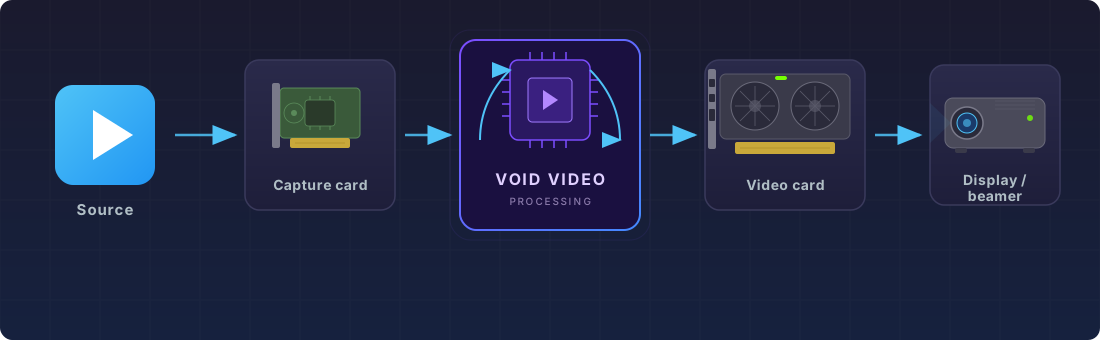
Void Video turns a PC with a capture card and video card into a state-of-the-art video processor. It captures your source signal, processes it in real time, and outputs to your display.
Install Card
Add a capture card to your PC’s PCIe slot and install drivers.
PCIe x1 or x4Connect HDMI
Route HDMI from your AVR or source to the capture card input.
HDMI 2.0/2.1Install Software
Download Void Video and configure for your display.
Linux (Debian 12+)Connect Display
GPU output to your projector or flat panel. Enjoy the difference.
HDMI / DP